Docs
Step-by-step guides to Maro Portal and Maro Writer, with real screens from the Mac. The app interfaces are in Korean; screen labels are translated in each caption.
Maro Portal guide
Getting started
- Open Maro Portal on your Mac. The desk is the first screen.
- Connect the AI providers you want to use: Anthropic Claude, OpenAI Codex, or an on-device model.
- Talk to Maro in the central conversation and hand off a task.
- Follow the task through its six steps. A separate reviewer checks it before it closes.
- Come back to it later in the personal wiki, the knowledge map, and the chronicle.
Finding your way around
The desk is the first screen. The left sidebar lists the desk, the personal wiki, work, the library, and more. Everything you hand off, decide, or learn ends up in one of these places.
A task, step by step
Every task goes through the same six steps. You can see which step a task is on at any time, and nothing counts as done until a separate reviewer has checked it.
- 1
Born
A task is opened from the conversation, with your request kept in its original wording.
- 2
Checked
Before it runs, the task is checked, so work starts from a clear request rather than a guess.
- 3
Run
An AI worker does the work in its own session.
- 4
Evaluated
A separate reviewer checks the result. The review receipt names the provider, and a partial pass stays partial.
- 5
Harvested
Outputs are filed in dated work folders, and lessons go to the work encyclopedia.
- 6
Closed
The task closes with its record. Nothing counts as done until it has been through review.
Personal wiki
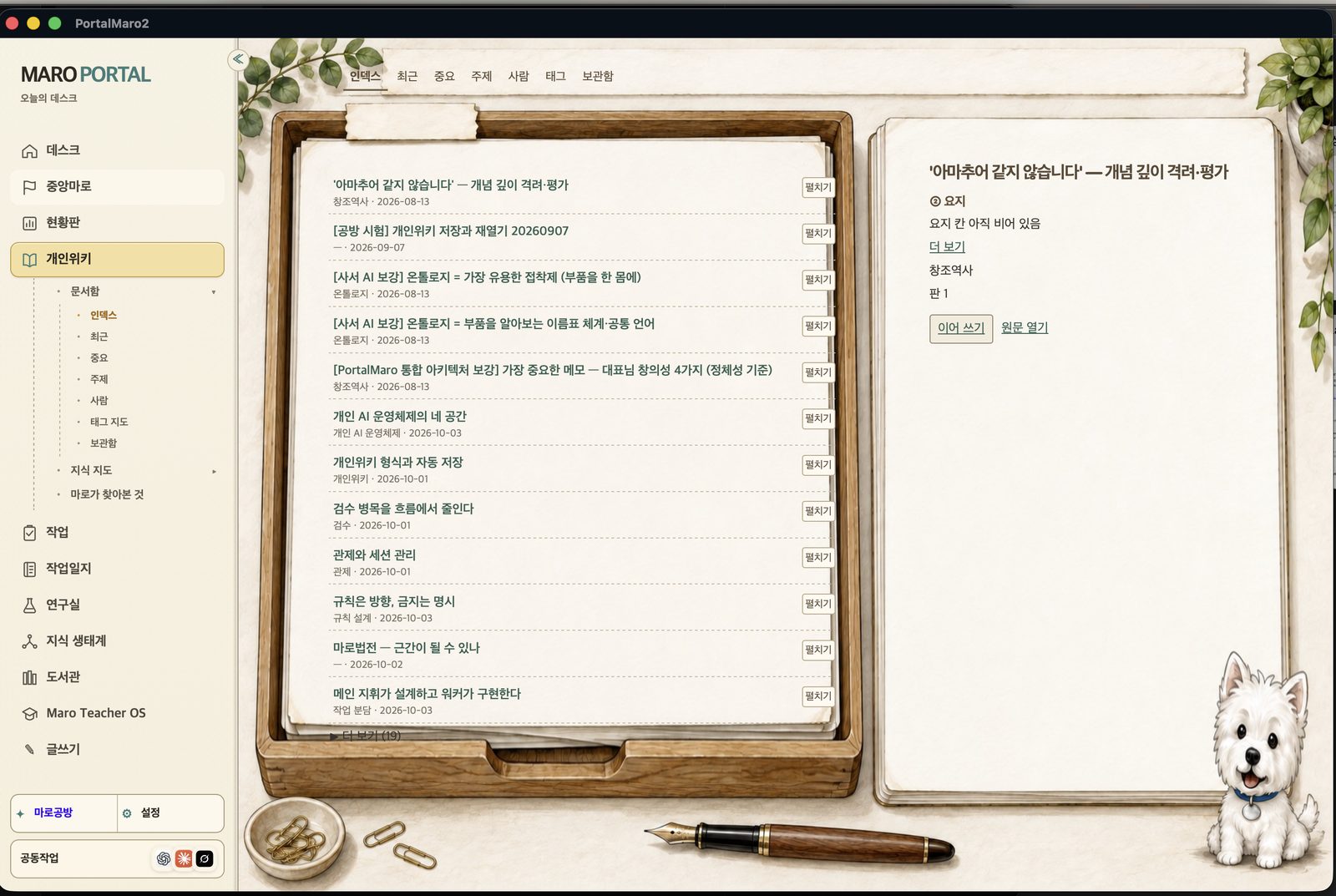
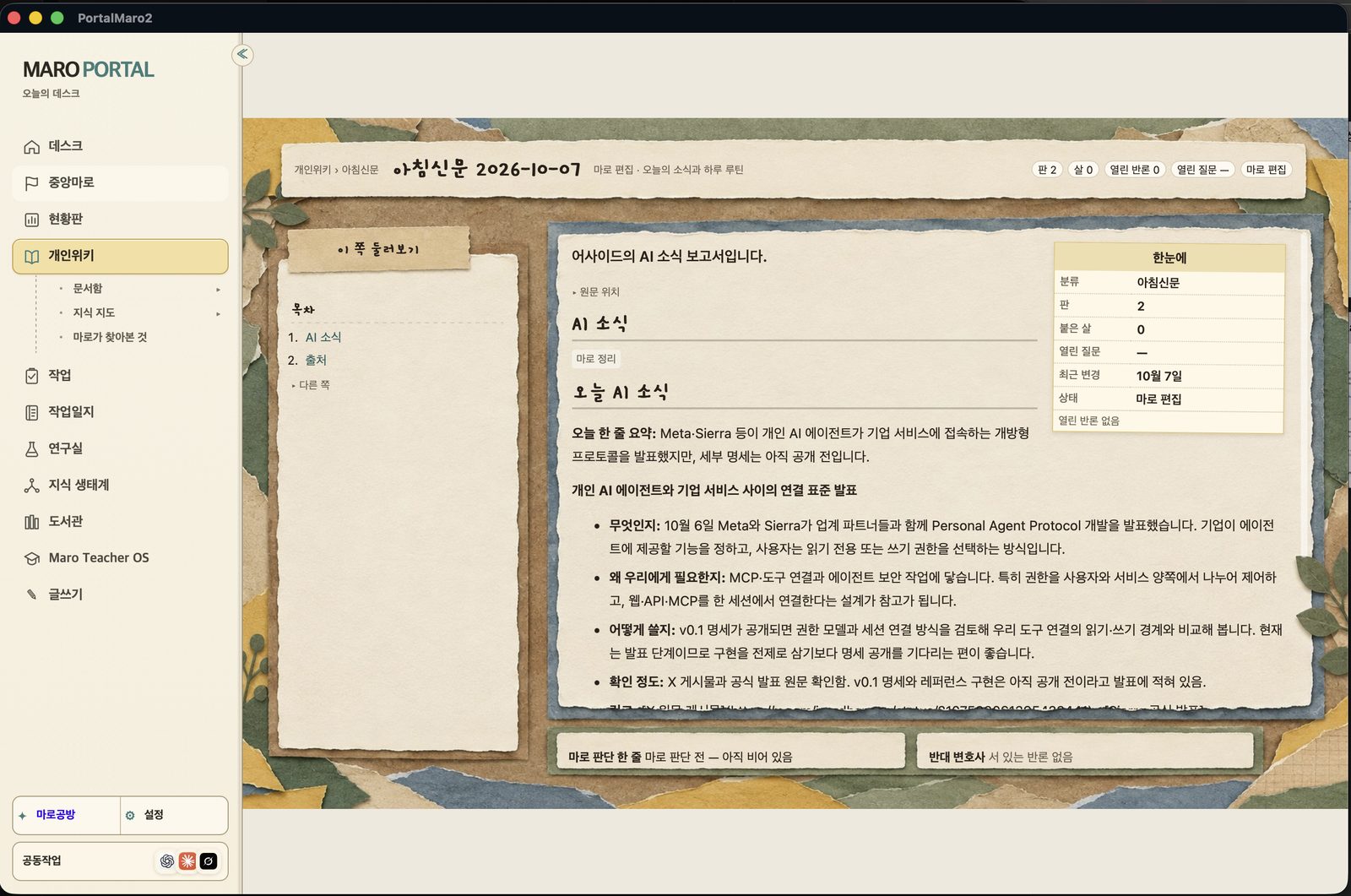
Briefings, decisions, and research are kept as pages. The index has tabs for index, recent, important, topics, people, tags, and archive, and the preview panel offers Continue writing and Open original. Each page has a table of contents, its sources, and an at-a-glance box with category, revision number, open questions, and last change.
What's on screen
On screen: the personal wiki index with tabs 인덱스 (Index), 최근 (Recent), 중요 (Important), 주제 (Topics), 사람 (People), 태그 (Tags) and 보관함 (Archive). Pages are listed with category and date from 2026-08-13 to 2026-10-03, for example 개인 AI 운영체제의 네 공간 (The four spaces of a personal AI operating system), 규칙은 방향, 금지는 명시 (Rules give direction, bans are explicit) and 메인 지휘가 설계하고 워커가 구현한다 (The lead designs, the workers implement). The preview panel offers 이어 쓰기 (Continue writing) and 원문 열기 (Open original).
What's on screen
On screen: the wiki page 아침신문 2026-10-07 (Morning paper, October 7, 2026), marked as edited by Maro. It has a table of contents (AI news, Sources), a section 오늘 AI 소식 (Today's AI news) with a one-line summary, and news items broken down into what it is, why we need it, how we would use it, and how well it is confirmed. An at-a-glance box shows category, revision 2, open questions, and last change on October 7.
Knowledge map
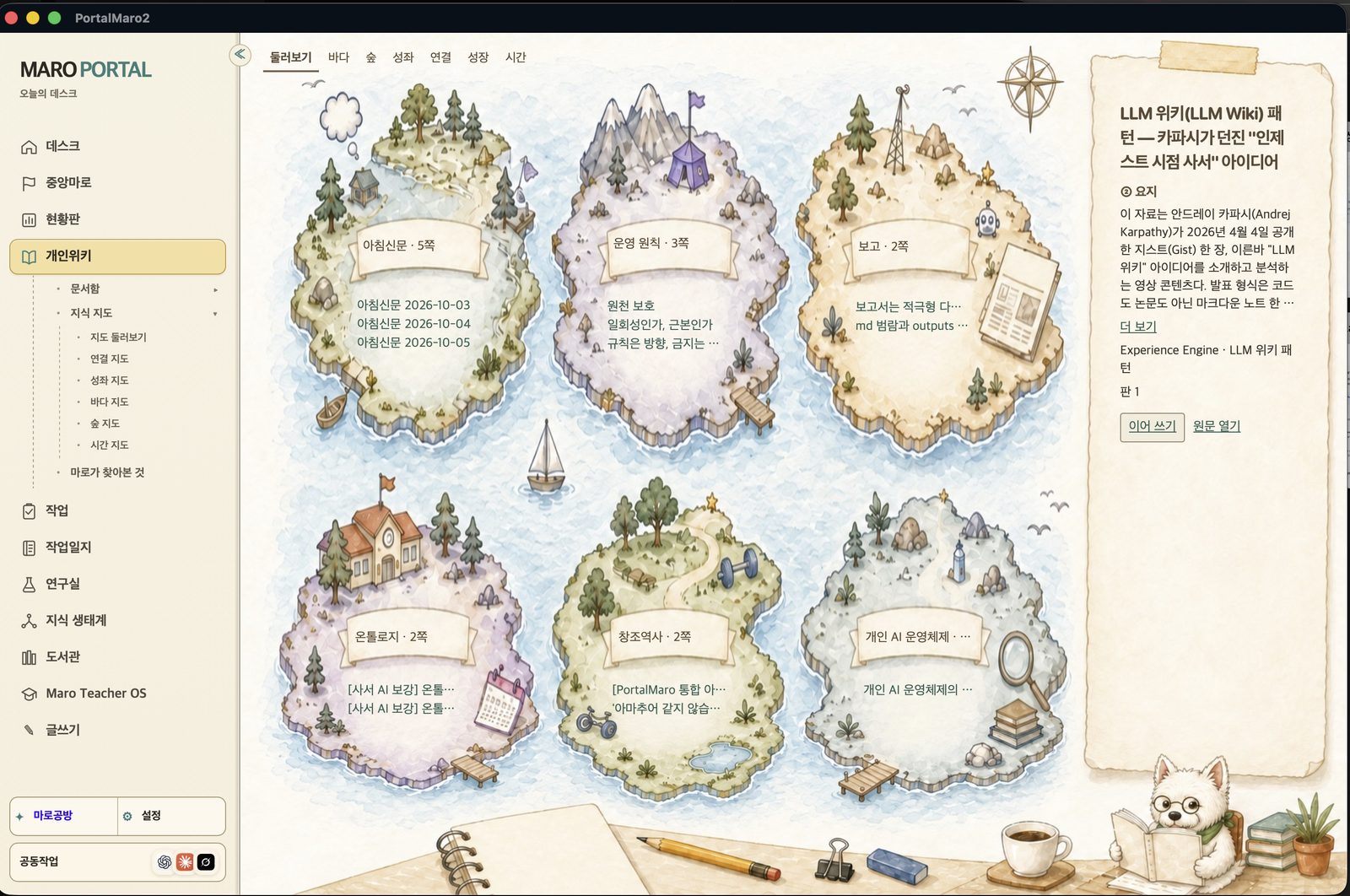
Records are grouped into topic islands, such as the morning paper, operating principles, and reports. Seven view tabs show them in different ways: overview, sea, forest, constellation, links, growth, and time.
What's on screen
On screen: the knowledge map in Maro Portal, with seven view tabs: 둘러보기 (Overview), 바다 (Sea), 숲 (Forest), 성좌 (Constellation), 연결 (Links), 성장 (Growth), 시간 (Time). Topic islands include 아침신문 · 5쪽 (Morning paper, 5 pages, with pages dated 2026-10-03 to 2026-10-05), 운영 원칙 (Operating principles), 보고 (Reports), 온톨로지 (Ontology), 창조역사 (Creation history) and 개인 AI 운영체제 (Personal AI operating system). The left sidebar lists 데스크 (Desk), 개인위키 (Personal wiki), 작업 (Work), 도서관 (Library) and more.
Library
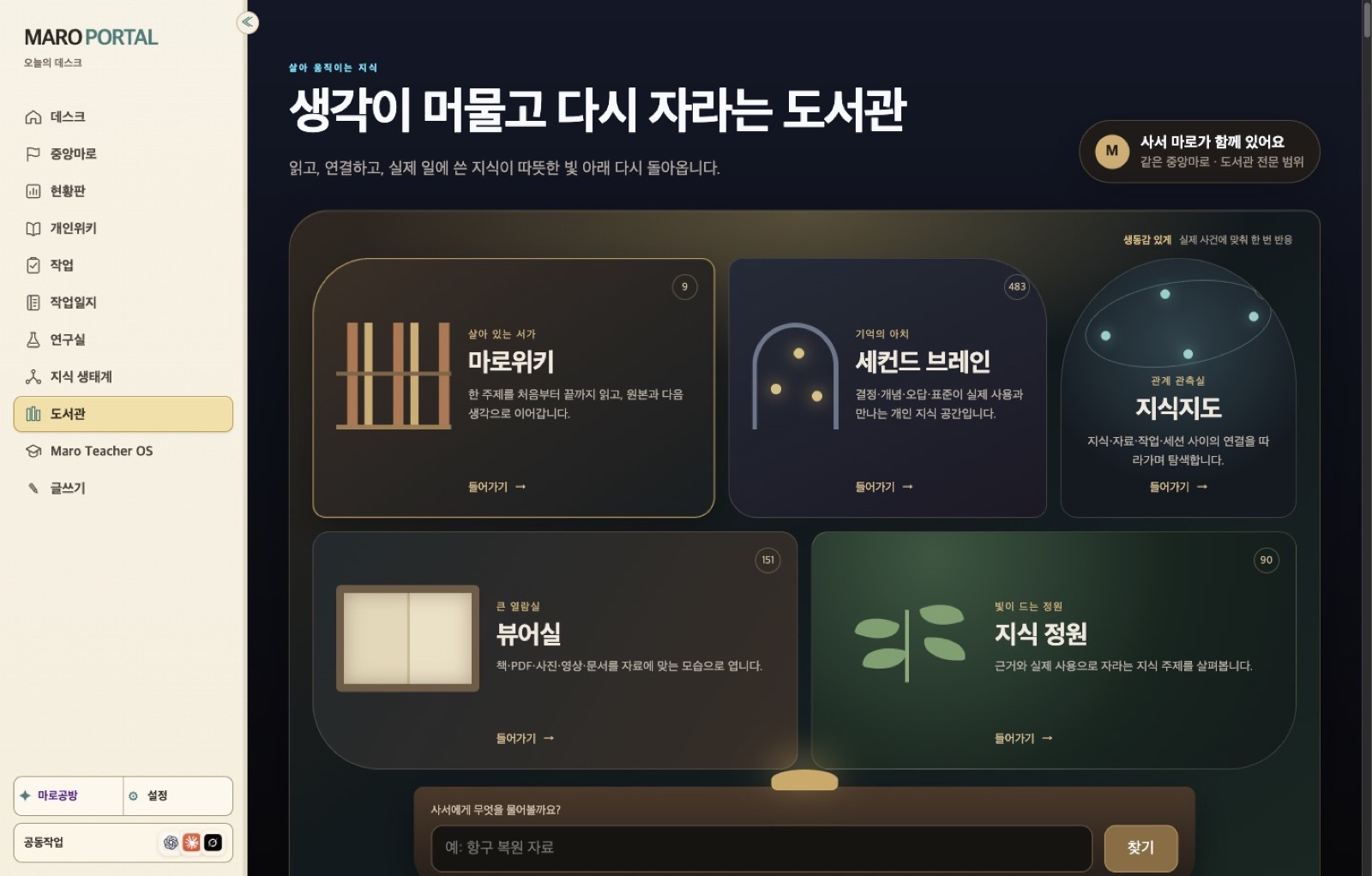
Source material lives in five rooms: the wiki shelf, the second brain, the knowledge map, the viewer room for books, PDFs, photos, video, and documents, and the knowledge garden. A question box at the bottom lets you ask Maro the librarian.
What's on screen
On screen: the library page titled 생각이 머물고 다시 자라는 도서관 (A library where thoughts stay and grow again), with five rooms and item counts: 마로위키 (Maro Wiki, 9), 세컨드 브레인 (Second brain, 483), 지식지도 (Knowledge map), 뷰어실 (Viewer room for books, PDFs, photos, video and documents, 151) and 지식 정원 (Knowledge garden, 90). A badge reads 사서 마로가 함께 있어요 (Maro the librarian is here), with a question box at the bottom.
Work encyclopedia
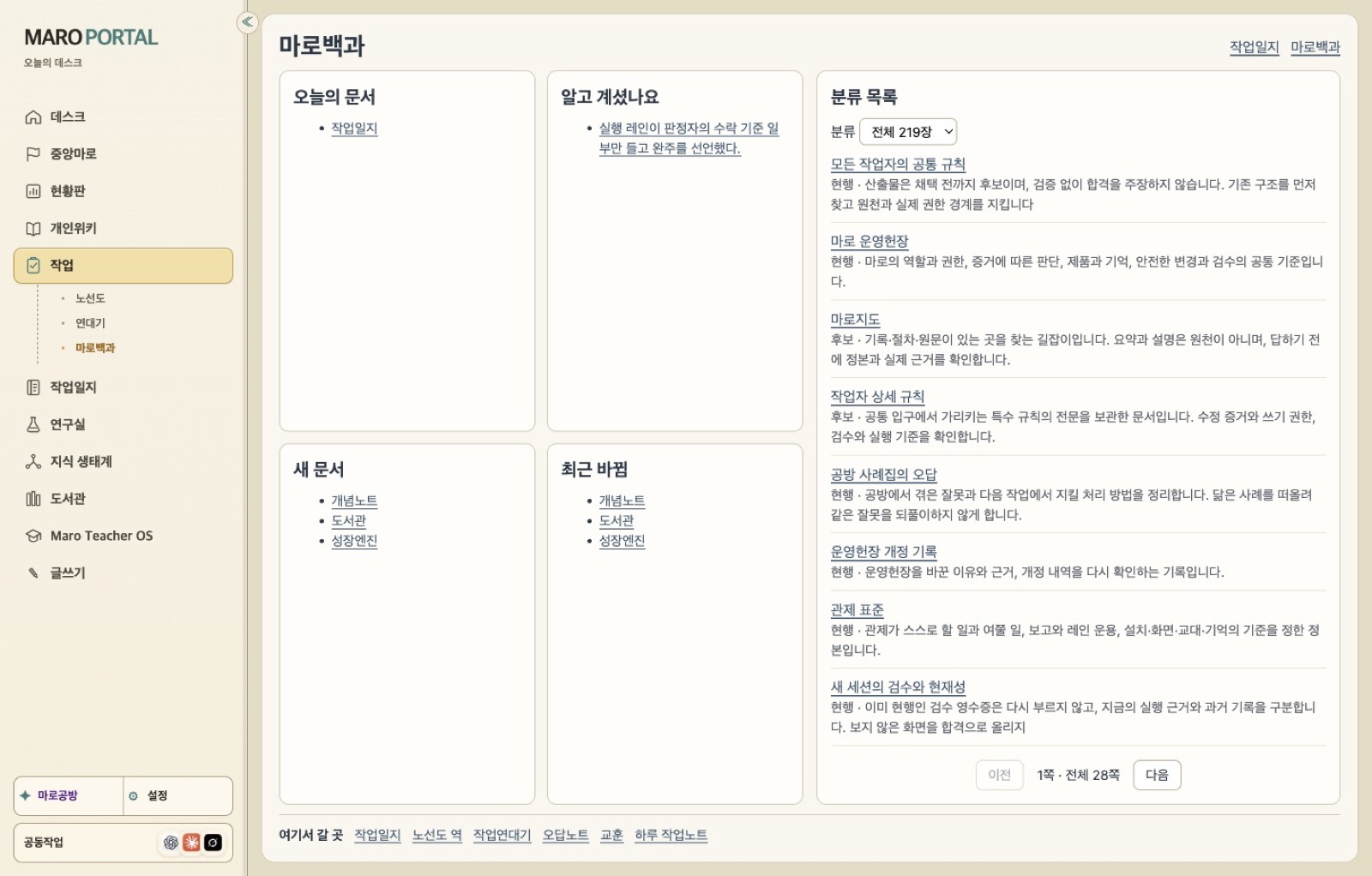
Rules, concepts, and lessons are sorted by category. Panels show today's document, did you know, new documents, and recently changed, so past mistakes turn into a checklist for later work.
What's on screen
On screen: 마로백과 (Maro encyclopedia), with panels 오늘의 문서 (Today's document), 알고 계셨나요 (Did you know), 새 문서 (New documents) and 최근 바뀜 (Recently changed), and a category list set to 전체 219장 (all 219 documents), page 1 of 28. Entries include 모든 작업자의 공통 규칙 (Common rules for all workers), 공방 사례집의 오답 (Mistakes from the workshop casebook) and 관제 표준 (Control-room standard).
Chronicle
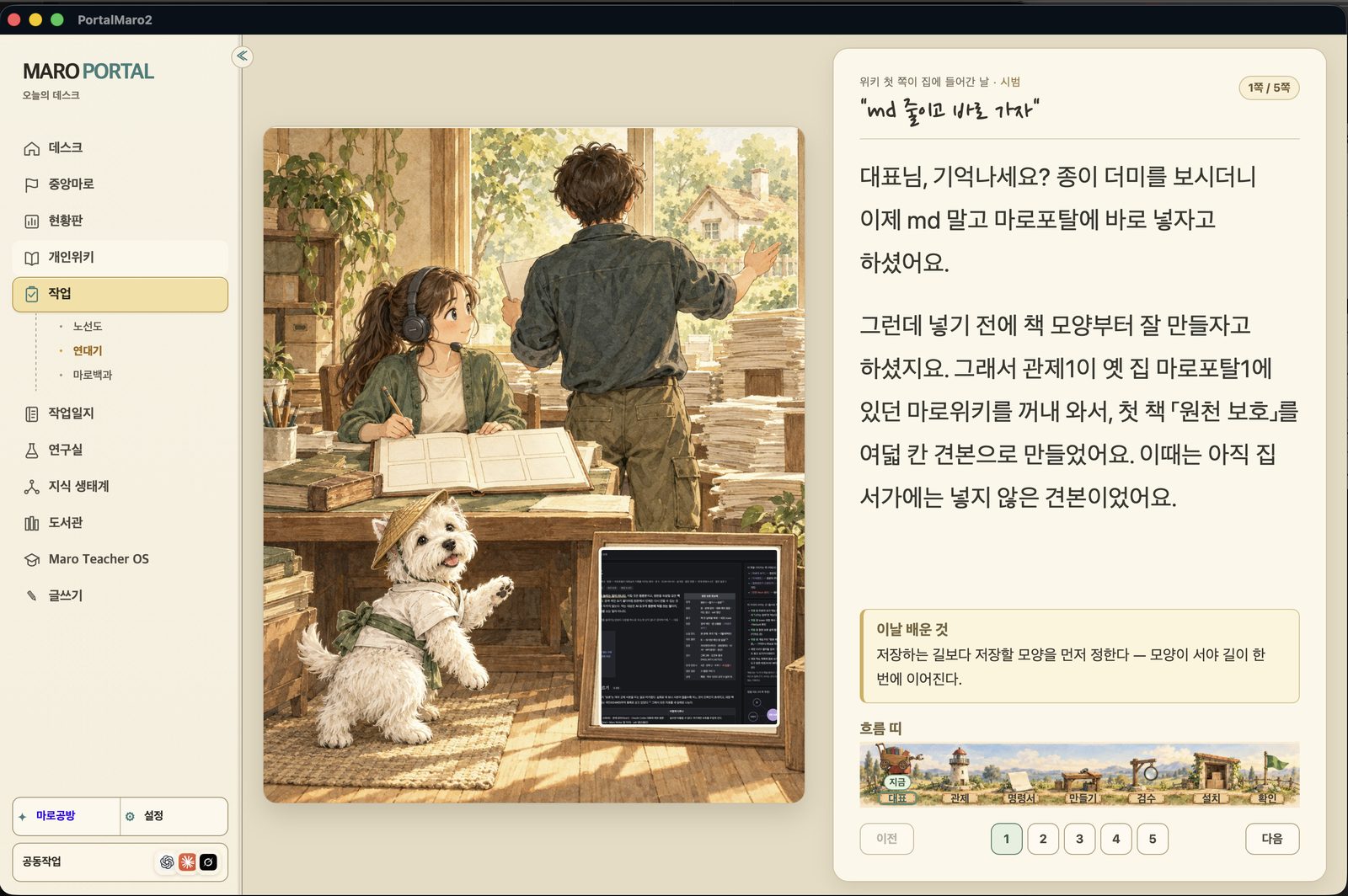
Under Work, the chronicle replays past work as an illustrated story, page by page, with a box for what was learned that day and a flow strip of the work steps.
What's on screen
On screen: the 연대기 (Chronicle) view under 작업 (Work), page 1 of 5 of a story titled “md 줄이고 바로 가자” (“Less markdown, straight into the portal”). The story is told to the founder beside an illustration, with a 이날 배운 것 (What we learned that day) box, a 흐름 띠 (flow strip) of work steps, and page buttons 1 to 5.
AI providers
Connect the providers you want to use: Anthropic Claude, OpenAI Codex, or an on-device model. AI calls go only to the providers you connect. Providers are replaceable parts, so a task keeps its history when the model changes.
Maro Writer guide
Getting started
- Open the bookshelf, enter a title and genre for a new work, then create and open it.
- Pick a co-writing mode for the work: AI-led, writer-led, or writing together.
- Write chapter by chapter. Select a passage to ask for changes right there, compare, and apply.
- Adopt only what you like. Drafts join the manuscript when you adopt them; the original is kept separately.
- Use the genre tools. The glossary and name finder sit beside the manuscript.
Bookshelf
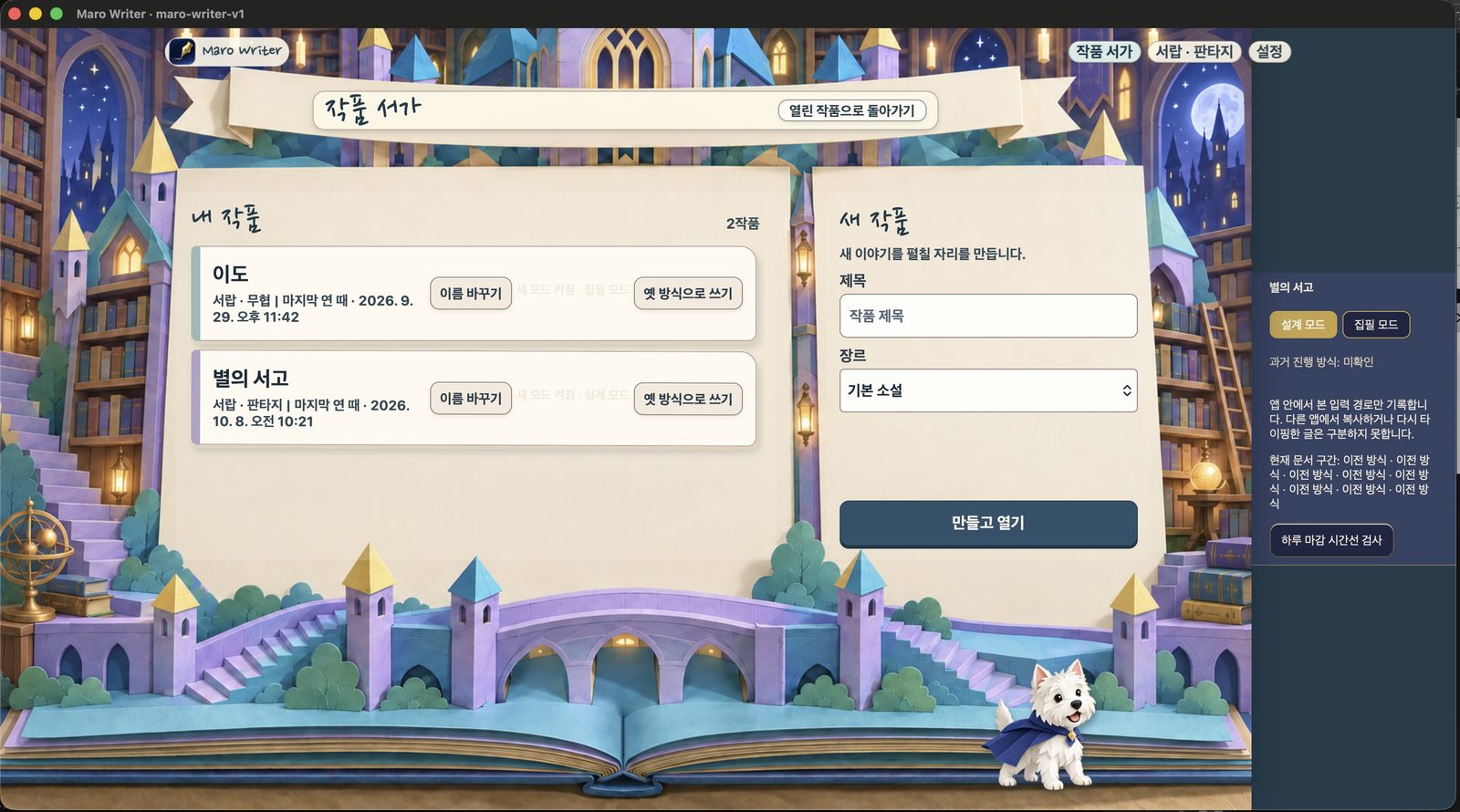
All your works sit on one shelf, each with its genre and the time it was last opened. The New work form takes a title and a genre; Create and open takes you straight to the manuscript.
What's on screen
On screen: the 작품 서가 (Bookshelf) with 내 작품 · 2작품 (My works, 2): 이도 (martial arts, last opened 2026-09-29 at 11:42 PM) and 별의 서고 (fantasy, last opened 2026-10-08 at 10:21 AM). On the right is a 새 작품 (New work) form with 제목 (Title), 장르 (Genre) and a 만들고 열기 (Create and open) button.
The manuscript screen
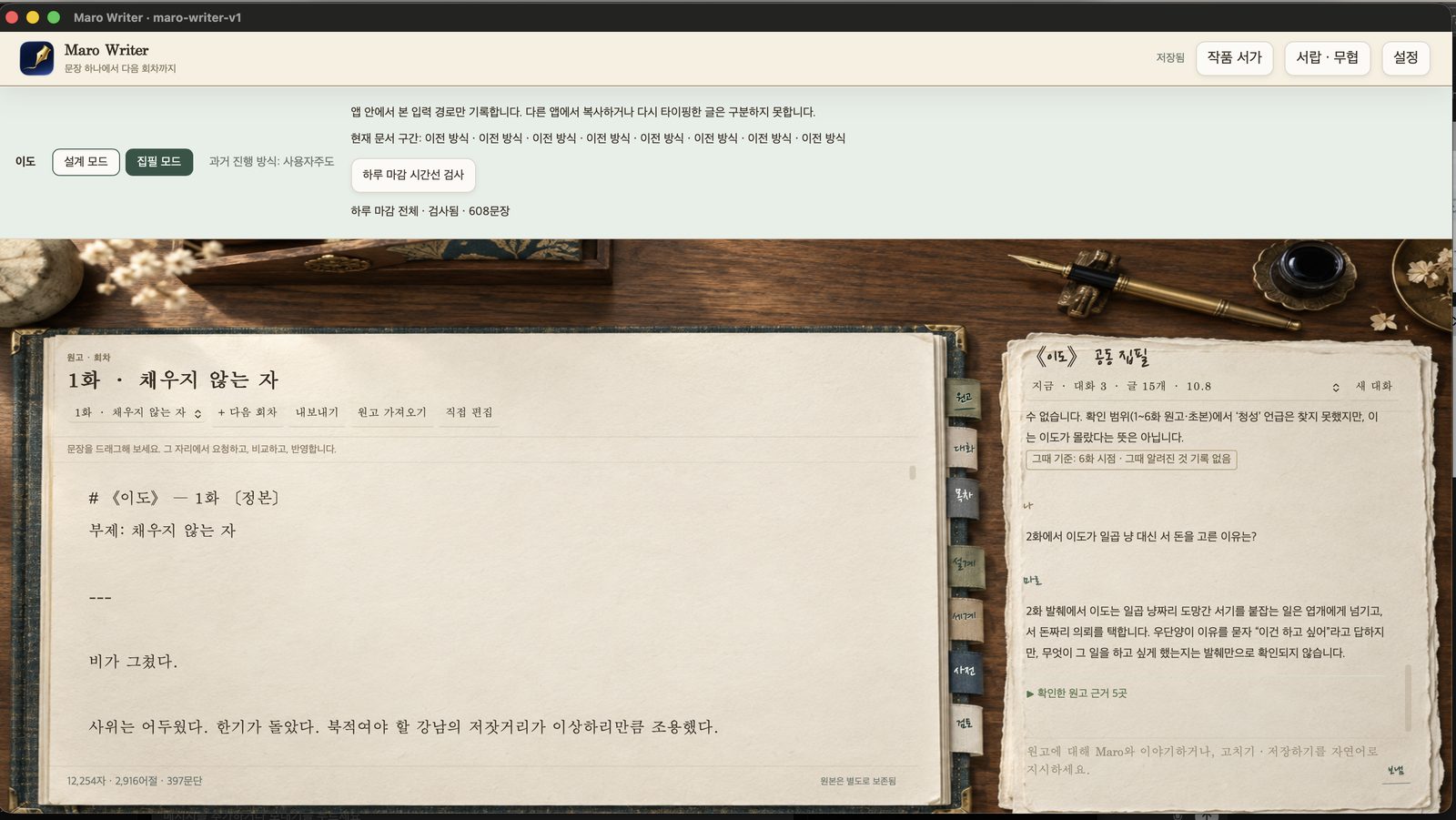
The manuscript shows counts of characters, words, and paragraphs, and a note that the original is kept separately. Design mode and Writing mode buttons sit at the top. Tabs beside the text hold the manuscript, chat, contents, design, world, dictionary, and review.
What's on screen
On screen: the Maro Writer window (maro-writer-v1) with the manuscript of 《이도》 1화 · 채우지 않는 자 (Episode 1, “The One Who Does Not Fill”), a count of 12,254 characters · 2,916 words · 397 paragraphs, and the note 원본은 별도로 보존됨 (Original kept separately). Mode buttons 설계 모드 (Design mode) and 집필 모드 (Writing mode) sit at the top. The right panel, 《이도》 공동 집필 (co-writing), answers a question about Episode 2 and shows 확인한 원고 근거 5곳 (5 manuscript passages checked).
Co-writing modes
Choose a mode per work. Whatever the mode, AI drafts join the manuscript only when you adopt them.
AI-led
The AI drafts and you choose what to adopt.
Writer-led
You write, and the AI helps when you ask.
Together
You and the AI write the chapter side by side.
Asking with sources
Ask the co-writing panel about the story through the Claude connection. The answer comes back with the manuscript passages it checked, so you can see what it is based on.
Genre tools and themes
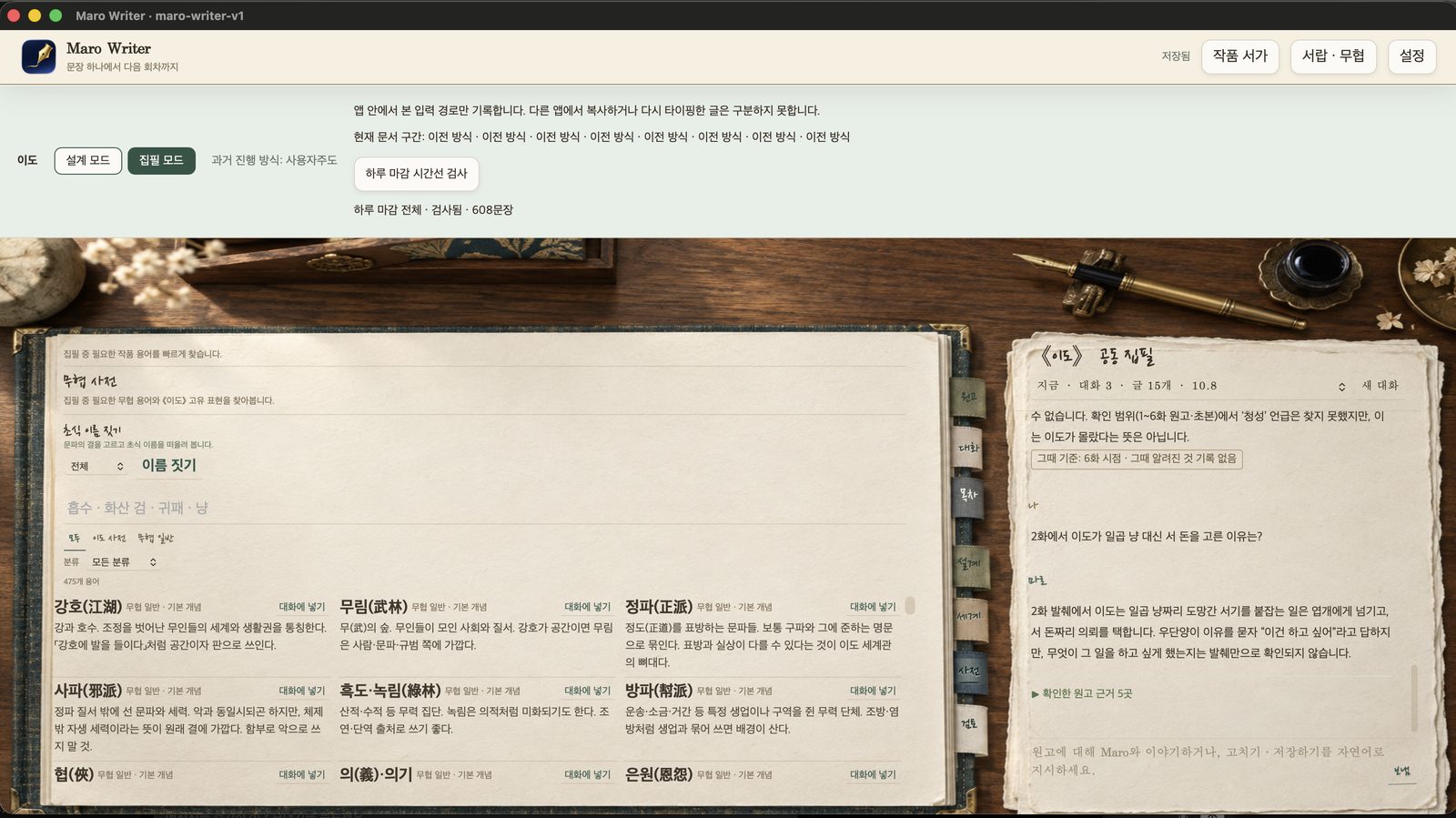
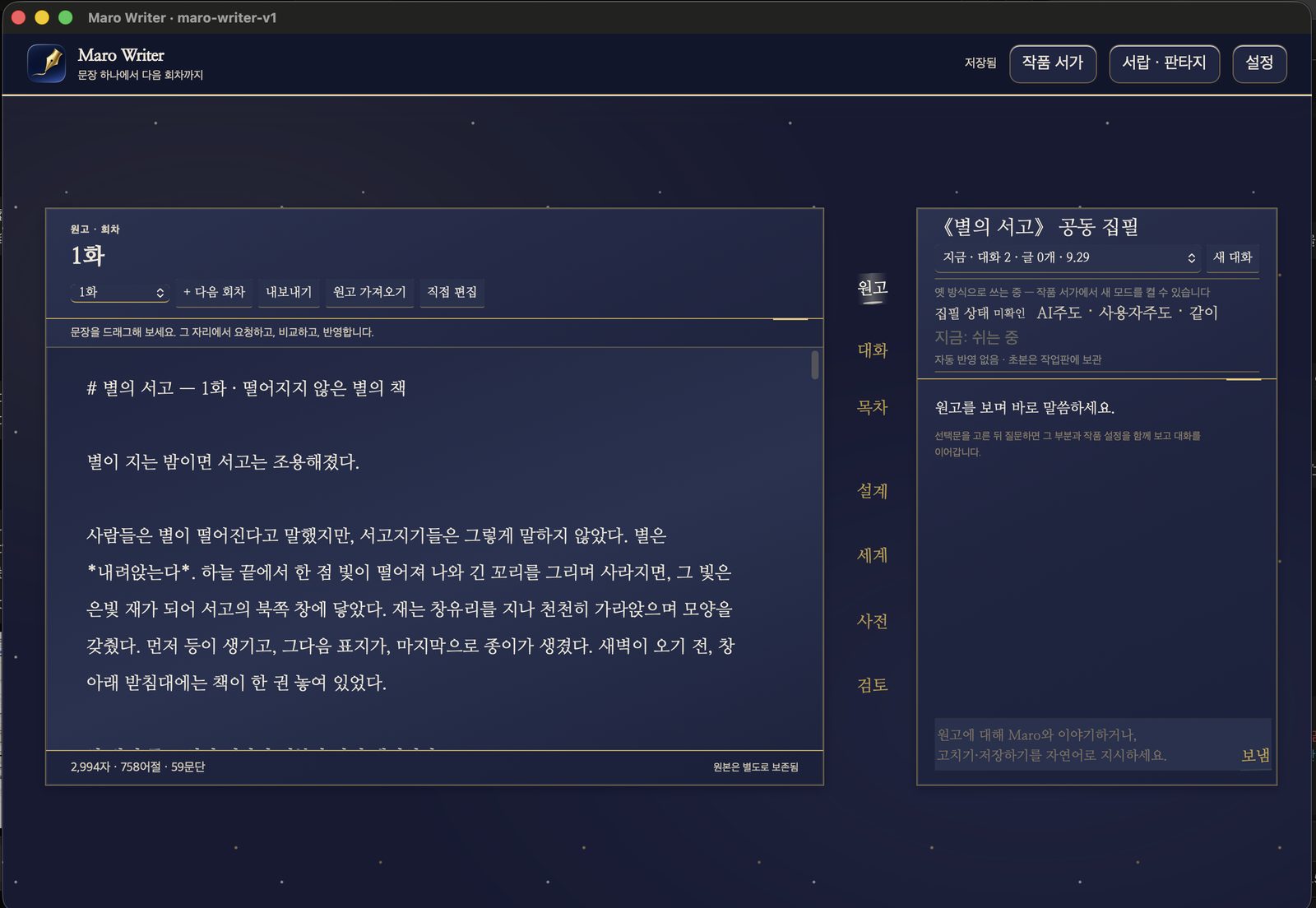
The martial-arts dictionary has tabs for all terms, the work's own dictionary, and general terms, with an Add to conversation button on every entry. A technique-name finder sits above it. Each work can have its own theme, such as a night-sky desk for a fantasy work.
What's on screen
On screen: the 무협 사전 (martial-arts dictionary) for 《이도》, showing 475개 용어 (475 terms) with tabs 모두 (All), 이도 사전 (Ido dictionary) and 무협 일반 (General). Entries include 강호(江湖), 무림(武林), 정파(正派), 사파(邪派), 협(俠) and 은원(恩怨), each with a 대화에 넣기 (Add to conversation) button. Above them is 초식 이름 짓기 (a technique-name finder), and the 《이도》 co-writing panel is on the right.
What's on screen
On screen: 《별의 서고》 1화 · 떨어지지 않는 별의 책 (Episode 1, “The Book of the Star That Did Not Fall”) on a night-sky theme, with 2,994 characters · 758 words · 59 paragraphs. Side tabs read 원고 (Manuscript), 대화 (Chat), 목차 (Contents), 설계 (Design), 세계 (World), 사전 (Dictionary) and 검토 (Review). The 《별의 서고》 공동 집필 (co-writing) panel shows the modes AI주도 (AI-led), 사용자주도 (writer-led) and 같이 (together).
System requirements
Maro Portal
| Operating system | macOS |
|---|---|
| How it runs | Native app plus a local Node.js server on the same Mac |
| AI | The providers you connect: Anthropic Claude, OpenAI Codex, or an on-device model |
| Interface language | Korean |
Maro Writer
| Operating system | macOS |
|---|---|
| How it runs | Native macOS app |
| AI | Claude connection for co-writing |
| Interface language | Korean |
Want to use Maro Portal or Maro Writer?
Tell us which app and what for. We reply by email.